Differences in jQuery and Media Queries Are Fixed With window.matchMedia()

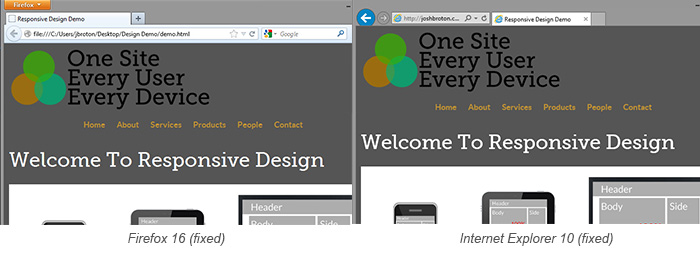
Recently, I discovered that the mobile menu solution that we use for our responsive designs (Matt Kersley’s Responsive Menu) is switching the menu to mobile earlier than anticipated in Firefox and IE10 (you can see the differences in the graphic above). After digging, I found it’s because the plugin is using the jQuery API’s .width() function to find $(window).width(). In Firefox and IE10, it follows the spec and includes the vertical scrollbar in that calculation. Webkit (Chrome and Safari) and IE8 don’t include the scrollbar width.The real problem is that no browser includes the scrollbar width when calculating width for use in media queries such as
@media only screen and (min-width:768px) {}The repercussion of that is the JavaScript spec and the CSS spec calculate width differently. Yikes. Even worse, the different browsers calculate $(window).width() differently. Luckily there’s a solution for that very problem.
Introducing window.matchMedia()
This handy little JavaScript function takes a media query as a parameter, then returns true/false if the browser matches that media query.
//returns true on devices with higher res monitors window.matchMedia(‘only screen and (min-width:768px)’);This function calculates uses the CSS rendering methods to calculate width, so javascript events that need to match a certain media query are far more accurate across all browsers. You can also fire off javascript events for certain media types like:
window.matchMedia(‘tv’);This gives you far more flexibility when writing your code.
EDIT: It needs to be mentioned that these don’t work at all in IE8, but like all problems involving IE8, Modernizr to the rescue! If you check the box “Media Queries” under Extras, it adds a polyfill for this function. Huzzah!
Back to the responsive menu
But what does that mean for our menu plugin? I forked the repository on GitHub and added matchMedia support. Luckily, all the major browsers that don’t support matchMedia calculate width at the same value as media queries, so it’s enough just to add that support when it’s available. Check it out on github here, use it, fork it and fix it.
I would love to hear from you in the comments of any situations like this that you’ve run across. Responsive design is amazing, but it’s challenging.